

Retail social fails in quiet ways. You ship a strong product drop, the feed looks busy for three days, then the calendar goes dark while the team chases inventory, returns, and store ops. Content autopilot is not a magic scheduler. It is a weekly operating system: plan once, approve with a short checklist, publish on a rhythm customers can feel, and measure the posts that actually move revenue.
This article is written for the marketer who owns the calendar at a boutique, DTC brand, or multi-location retailer. You will leave with a week plan you can run Monday morning, an approval path that does not stall creative, a publishing cadence that respects retail seasons, and a measurement stack that ignores vanity metrics. If you want the product side of this workflow, start from the Neurollamas home preview of Content Autopilot, then build creative assets in Neurollamas Studio.
What content autopilot means for retail (and what it does not)
Autopilot, in a retail marketing sense, means the heavy thinking happens before the week starts. Themes, SKUs, offers, and formats are decided when your head is clear. Publishing becomes execution, not improvisation. Approvals become a gate with a time box, not a group chat that dies at 11 p.m.
It does not mean every caption writes itself and ships without a human. Retail brands get burned when legal, pricing, or stock reality never touches the draft. The goal is fewer last-minute scrambles and more repeatable weeks, not zero judgment.
HubSpot’s content operations writing still holds for social: treat the calendar as a production system with owners, stages, and feedback loops, not a wish list. See their guidance on building a content calendar that teams can actually run in the HubSpot blog on content calendars. Pair that mindset with Meta’s own publishing and insights basics in Meta Business Help so your tools match how Instagram and Facebook report delivery.
The four jobs of a retail week
- Demand: make people want a product or category this week.
- Proof: show real use, real stock, real store energy.
- Offer: move a decision with a clear reason to buy now.
- Service: answer friction (sizing, shipping, store hours, care).
Most weak calendars only do demand. Autopilot weeks balance all four so the feed does not look like a permanent sale flyer.
Plan the week before Monday: a retail content board
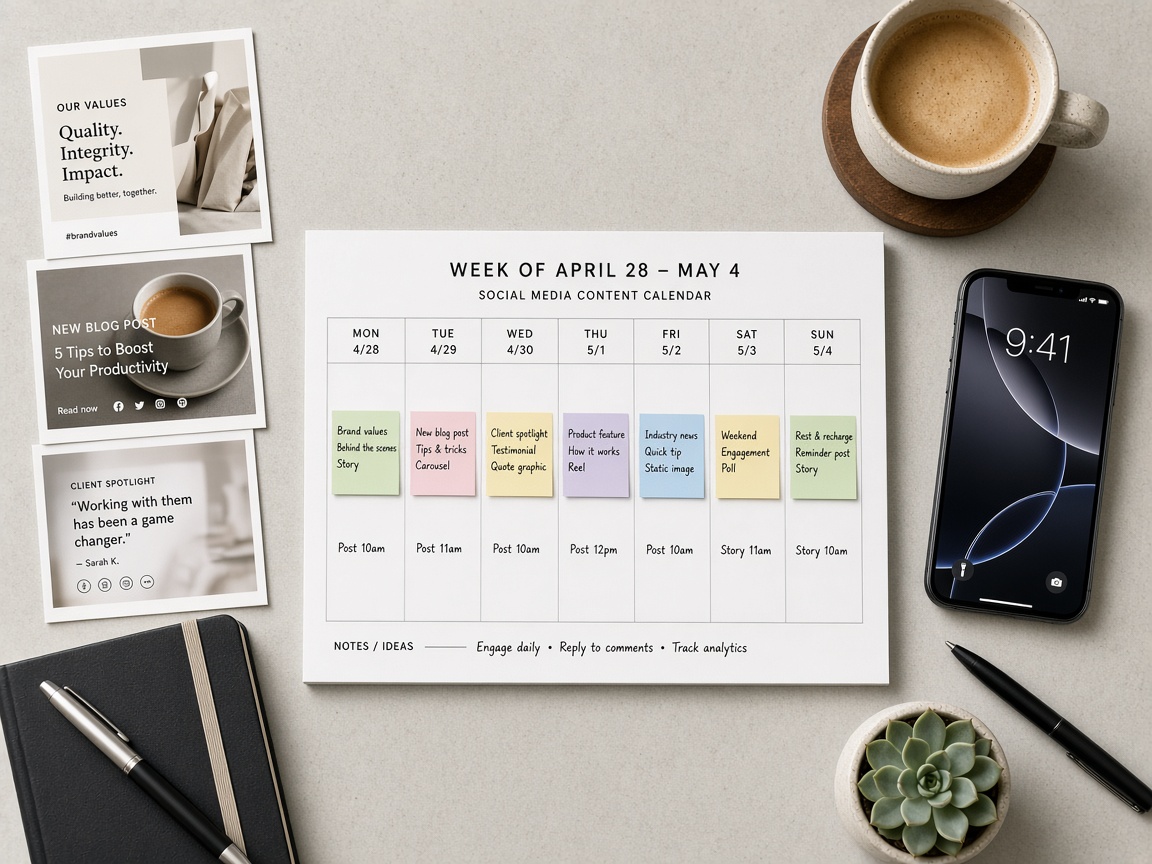
Block ninety minutes late Sunday or early Monday. Bring merchandising notes, stock levels, and one commercial goal. Examples: sell through a colorway, fill weekday store traffic, or push online AOV with a bundle. Write the goal in one sentence at the top of the board. If you cannot state the goal, you will measure noise later.
Slot map for seven days
Use a simple grid. Columns are days. Rows are formats: feed post or carousel, Reel, Story sequence, and optional email or SMS teaser if those channels sit with the same owner. You do not need twelve posts a day. You need coverage that matches your staffing.
- Monday: category hero or newness. One clear SKU cluster. Caption leads with benefit, not brand poetry.
- Tuesday: proof. Fit check, unboxing, staff pick, or customer photo you have rights to use.
- Wednesday: education. Care tips, how to style, how to choose size. Soft CTA to shop or visit.
- Thursday: offer or urgency that is true. Inventory countdown, weekend hours, limited drop window.
- Friday: lifestyle Reel or short motion that shows the product in context.
- Saturday: store or community energy. Foot traffic, event, local angle. Local shops should also keep Instagram SEO hygiene; see Instagram SEO for local shops.
- Sunday: service or next-week tease. FAQ Story, restock note, or “what’s coming.”
If your team can only ship five pieces, collapse Wednesday into Stories and skip Sunday. Protect Monday, Tuesday, Thursday, and Friday. Those four carry most commercial weight for retail.
One photo, many assets
Retail teams waste hours hunting new photography every day. Strong weeks start from a small asset pool. Take one clean product photo and expand it into a feed crop, a Story safe zone, a carousel of angles or use cases, and a short motion cut. The sibling playbook how small shops turn one product photo into a week of Instagram content walks that production path in detail. Autopilot assumes you already have that habit.
When you generate or edit in Studio, keep the same lighting language and crop rules across the week so the brand feels intentional, not random. Autopilot fails when Monday looks like a catalog and Friday looks like a different company.
Approvals that protect brand without killing speed

Approvals are where retail weeks die. Legal wants every claim reviewed. Founders want to rewrite captions. Store managers want a different SKU. Fix this with a three-lane system: draft, brand check, publish ready.
Who touches what
- Creator or social lead: owns draft quality, format fit, and on-brand voice.
- Merch or ecom: confirms SKU, price, stock, and link destination.
- Brand or founder (optional): reviews only claims, partnerships, and sensitive creative. Not every emoji.
Set a rule: if a comment is preference, not risk, it does not block publish. Preference goes into a backlog for the next creative briefing. Risk (wrong price, unavailable size, medical claim, competitor jab) blocks until fixed.
A fifteen-minute approval checklist
- Is the SKU in stock for the channels you mention?
- Is the price and promo code accurate through the publish window?
- Does the CTA match the destination (PDP, collection, store locator, DM keyword)?
- Are faces, music, and UGC cleared for paid if you might boost later?
- Does the caption avoid promises ops cannot keep (same-day ship, endless sizes)?
Run this checklist in one shared doc or in your Autopilot queue. Do not run it in five apps. Neurollamas Content Autopilot is built so the weekly batch, captions, and publish path live in one place after your brand profile is set, which cuts the “where is the latest draft?” tax.
SLA for comments and revisions
Give approvers a hard window. Example: drafts land Monday 10:00, approvals due Monday 14:00, publish starts Monday 17:00 for the first piece. Late feedback becomes next week’s change, unless it is a risk item. Without an SLA, autopilot becomes “almost automated” theater.
Publishing rhythm retailers can sustain
Cadence is a promise to your audience and to your ops team. Pick a rhythm you can keep in a sale week and a quiet week. Spiking to daily Reels for ten days, then vanishing for two weeks, trains people to ignore you.
Baseline rhythm by brand stage
- Solo or tiny team: 4 feed pieces + 3 Story days per week. One Reel minimum.
- Small brand with a part-time creator: 5 to 6 feed pieces, Stories most days, 2 Reels.
- Team with retail + ecom: daily Stories, 5 feed posts, 3 Reels, one carousels-heavy education piece.
Time of day matters less than consistency, but retail still has patterns. Lunch and early evening often work for browsing. Weekend mornings work for store traffic prompts. Test in four-week blocks, not day by day, or you will chase noise.
Seasonal overlays without rebuilding the system
Keep the same slot map. Swap the commercial goal and the hero SKUs. Black Friday is still Monday demand, Tuesday proof, Thursday offer. The offer intensifies; the skeleton stays. That is the point of autopilot: structure absorbs seasonality so you are not inventing a new process every holiday.
For multi-location brands, publish national creative on the brand account and let stores localize Stories with hours, parking, or event details. National captions should not invent store-level facts. Local SEO and local Instagram search habits still matter when people look for a shop near them; again, the local shops SEO guide covers profile and caption work that supports discovery beyond paid.
Captions, CTAs, and links that serve the week goal
Every piece in the week should point at the week goal, even if the tone is soft. Soft does not mean vague. “Shop the navy knit” is soft and clear. “Vibes for the season” is soft and useless.
CTA patterns that match retail intent
- Browse: “See the full edit on the site” with a collection link.
- Decide: “Compare fits in the carousel, then pick your size.”
- Buy: “Order tonight for weekend wear” only when ops can deliver.
- Visit: “Saturday try-on 11 to 4, Main Street” with hours that are real.
- Save: “Save this care guide before wash day.” Saves support later remarketing and organic reuse.
Rotate CTAs across the week so you are not yelling “shop now” seven times. Thursday can carry the hard ask. Wednesday can teach. Tuesday can prove. The sequence sells better than seven identical shouts.
Measure what moves sales, not what flatters the dashboard
Likes are cheap to celebrate and expensive to manage toward. Retail marketers need a short metric tree tied to money and store outcomes. Meta’s insights tell you delivery and engagement. Your site analytics and POS tell you whether anyone paid. Connect those layers or you will optimize for applause.
Google’s documentation on measuring conversions and ecommerce events is still the practical backbone for online attribution. Start from Google Analytics help on ecommerce measurement and make sure product views, add-to-carts, and purchases are tracked before you argue about which Reel “worked.” For social delivery context, keep using Meta Business Help so you read reach, saves, and profile actions correctly.
Primary metrics (tie to revenue)
- Attributed revenue or assisted revenue from UTM-tagged links on the week’s posts (online).
- Add-to-cart and checkout starts from social sessions for featured SKUs.
- In-store proxy: use a unique offer code, QR on a Story, or “mention this post” only when staff will actually record it.
- Product page views for featured SKUs in the 48 hours after publish, compared with a quiet baseline week.
Secondary metrics (leading indicators)
- Saves and shares on education and proof posts (intent to reuse, not idle likes).
- Reel watch-through on the first three seconds and average watch time (hook quality).
- Profile visits and link clicks (traffic quality gate).
- DM volume asking size, stock, or store questions (service demand you can convert).
Vanity metrics you should demote
- Raw like count without click or save context.
- Follower spikes with no landing traffic.
- Reach that comes from unrelated viral noise when your featured SKU did not move.
- “Best time to post” myths that change every week without a revenue test.
Run a simple weekly scorecard: goal, posts shipped, revenue or proxy, top two posts by assisted outcome, one post to kill next week, one post to repeat. Ten minutes. If the meeting needs a forty-slide deck, your measurement is too theatrical for a retail calendar.
A Monday-ready operating checklist
Use this as your autopilot runbook. Copy it into your project tool and assign names.
- Confirm the commercial goal and hero SKUs with merch.
- Pull or create the asset pool (hero photo, lifestyle, detail, motion).
- Draft the seven-day (or five-day) slot map with captions and CTAs.
- Tag each piece with UTM parameters or unique codes before approval.
- Run the fifteen-minute risk checklist with merch.
- Lock publish times. Schedule what you can. Hold live Stories for same-day truth.
- Publish on rhythm. Reply to DMs and comments in a fixed daily window.
- Friday scorecard: revenue/proxy, keepers, cuts. Brief next week in the same doc.
When creative production is the bottleneck, stop inventing new concepts midweek. Reuse the product-photo expansion method and keep Studio for variants, not reinvention. Browse more operator guides in the Neurollamas magazine when you need adjacent tactics for SEO, Reels, or photography.
Where Neurollamas Content Autopilot fits
Spreadsheets can hold a calendar. They cannot hold brand context, batch captions, media generation, and publish flow in one operator loop. Neurollamas Content Autopilot is for teams that want the week planned from brand inputs, reviewed before it goes live, and shipped without hopping across five tabs. Preview the flow on the Content Autopilot section of the site, build or refine visuals in Studio, and keep learning from other retail playbooks in the magazine.
If you are starting from almost nothing, do not automate chaos. Spend one week installing the slot map and approval SLA by hand. The second week, move the same structure into Autopilot so the tool enforces the rhythm you already trust.
Common failure modes (and the fix)
The calendar is full, the shelf is wrong
You promoted a size run that sold out Tuesday. Fix: merch sign-off is mandatory on Thursday offer posts and any “available now” language. Swap to waitlist or alternate color instead of ghosting the comments.
Approvals arrive after publish time
Fix: SLA plus “silence means preference backlog.” Risk items still block. Taste notes do not.
Everything is a Reel, nothing is a system
Fix: return to the four jobs. Reels are a format, not a strategy. Proof and service posts still carry purchase confidence.
You report likes to leadership
Fix: change the scorecard this week. Leadership learns to ask for revenue proxies if that is what you put in front of them.
Local stores feel ignored
Fix: national brand owns the spine; stores own Story localization. Give them three templates, not a blank phone camera and hope.
Closing: run the week like ops, not like inspiration
Retail content wins when it behaves like inventory planning: forecast demand, allocate attention, check constraints, ship on time, review sell-through. Inspiration still matters inside the creative, but the operating layer should be boring and repeatable. Plan the board, approve with a short checklist, publish on a rhythm you can keep, and measure the posts that move carts and foot traffic.
When you are ready to run that loop in one product path, open Neurollamas Content Autopilot, keep production support in Neurollamas Studio, and treat the magazine library at /mag/ as your ongoing briefing shelf for Instagram SEO, product photography weeks, and the rest of the retail stack.