

Most small shops do not have a content team. They have a phone, a product table, and a feed that goes quiet every time the owner gets busy. The fix is not posting more random shots. It is building a weekly system from one strong product photo, then stretching that frame into posts, Stories, and carousels without looking like you copied the same image seven times.
I have run Instagram for retail brands that sold candles, jewelry, skincare, and home goods. The shops that stayed consistent rarely shot new product every day. They shot once with care, then worked the file. AI image tools and light editing make that workflow faster now, but the planning logic has not changed. You still need a hero image, a weekly job for each asset, and captions that sound like a human who knows the product.
This article walks through that system in plain steps. You will see how to pick the photo, how to generate useful variants, how to assign each day a format, and where tools like Neurollamas Studio fit without turning your brand into a filter farm. For related tactics on short video and local discovery, see AI Reels that sell for product brands and Instagram SEO for local shops.
Why one photo can carry a full week
Instagram rewards rhythm more than novelty for small accounts. Followers remember your product, your lighting style, and your voice. They do not need a new SKU every day. What they need is a reason to stop scrolling: a detail, a use case, a before-and-after crop, a Story poll, a carousel tip.
One well-lit product photo is a content seed. From that seed you can create:
- A clean feed post that introduces or reintroduces the product
- A detail crop for texture, label, or packaging
- A lifestyle or scene variant that places the product in context
- A carousel that teaches how to use, style, or gift the item
- Stories that ask questions, show process, or point to the feed post
- A soft sale frame with price, offer, or shop link language in the caption
The mistake shops make is treating every post as a separate photo shoot. That burns time and creates inconsistent lighting. Treat the week as one campaign built from one master file. Variation comes from crop, composition, background, copy, and format, not from seven unrelated photos.
Start with a master photo that can survive editing
Bad masters produce bad AI variants. If the source is dark, blurry, or cluttered, tools will invent details you do not want. Spend twenty focused minutes on the master shot before you open any generator.
What a usable master looks like
Shoot on a clear surface with soft, even light. Window light works. Avoid harsh overhead bulbs that create yellow patches. Keep the product centered enough that you can crop later without losing the subject. Leave a little negative space around the edges so Stories stickers and carousel text do not cover the hero.
Capture these three versions of the same setup if you can:
- Full product, front-facing, clean background
- Three-quarter angle that shows depth
- Close detail of the most distinctive feature
You only need one of these as the week’s master if time is tight. The front-facing clean shot is the safest. The other two become optional spice for midweek posts.
Quick quality checks before you generate anything
- Is the label readable at phone size?
- Are shadows soft enough that the product still looks real?
- Did you remove tape, packing peanuts, and brand-wrong props?
- Is the color close to what customers see in person?
If color is off, fix it first with light editing. AI cannot fix a brand promise if your candle looks orange when the jar is cream. Meta’s creator and business resources still emphasize clear creative and accurate product representation; start from their guidance on posting and professional tools when you need platform-side basics: Meta Business Help and Instagram for creators.
Build a seven-day content map from a single seed
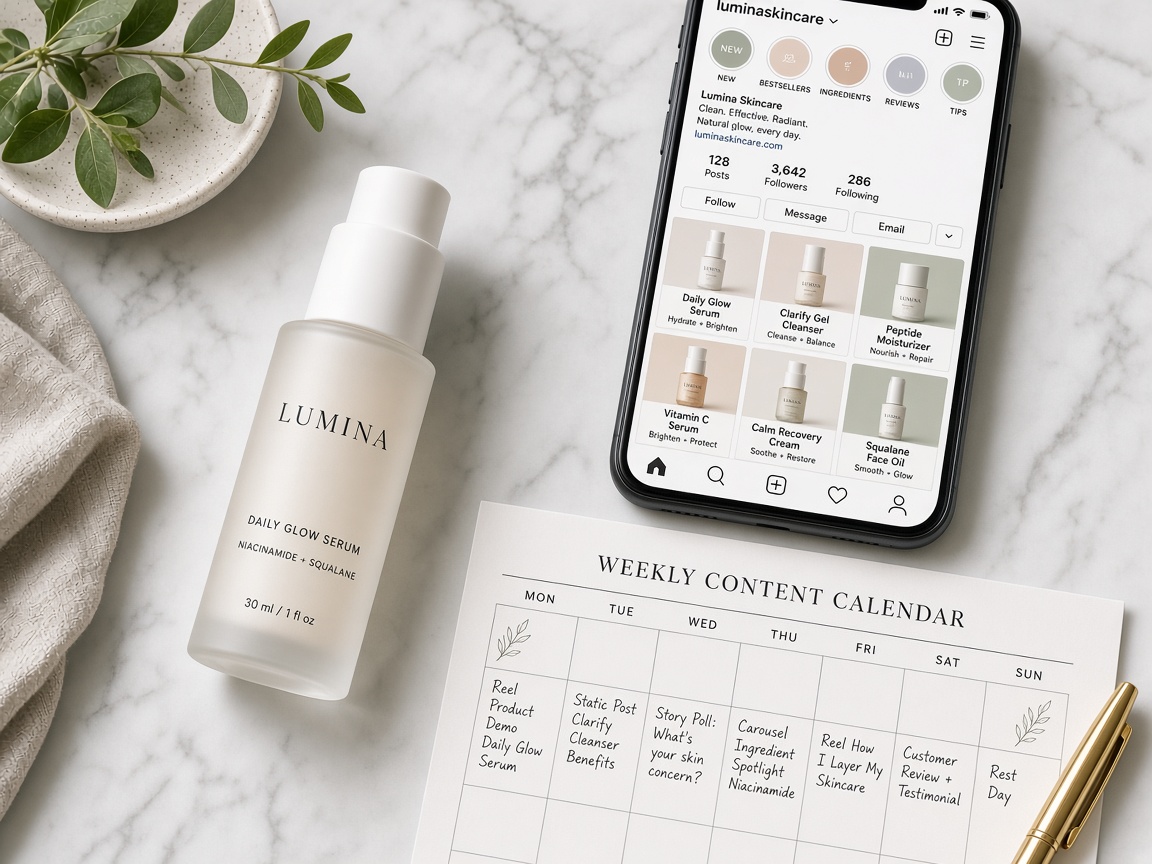
Do not open the tool and hope. Decide the week’s jobs first. Here is a practical map I use for product retailers. Adjust the days to match when your audience is online, but keep the job mix.
| Day | Format | Job of the post | How you alter the master |
|---|---|---|---|
| Monday | Single feed post | Introduce or reintroduce the product | Clean hero, minimal crop, strong caption |
| Tuesday | Stories (3–5 frames) | Warm up the audience and ask one question | Crops, stickers, short text overlays |
| Wednesday | Carousel (5–7 slides) | Teach a use, style tip, or gift idea | Detail crops + scene variants + text slides |
| Thursday | Feed post | Show context or lifestyle angle | Background or scene change from AI tools |
| Friday | Stories + optional feed | Soft sale or offer reminder | Same hero with offer text in Stories |
| Saturday | Carousel or single | Social proof angle or FAQ | Crop + caption focus, light edit only |
| Sunday | Stories | Behind-the-scenes or next-week tease | Process crops, packing table, soft blur variants |
Notice that only two or three days need heavy AI generation. The rest lean on crops, captions, and Stories chrome. That keeps the feed coherent and saves credits, time, and brand trust.
How to create variants without breaking brand trust
AI image tools are useful when they extend a real product photo. They are risky when they invent a product that no longer matches what you sell. Keep a hard rule: the product itself stays honest. Change the scene, crop, lighting mood, or supporting props. Do not invent a new lid shape, a wrong colorway, or a fake label.
Safe edits that still feel fresh
- Background swaps: studio white to warm wood, linen, marble, outdoor patio
- Scale and crop: square for feed, 9:16 for Stories, tight detail for texture
- Lighting mood: brighter morning light, softer evening warmth, same product
- Prop placement: add a cup, book, plant, or gift wrap that fits the brand
- Text space: generate a cleaner negative space version for quote slides
Edits that usually hurt small brands
- Changing product geometry so the item looks premium but inaccurate
- Over-smoothing surfaces until packaging looks plastic
- Adding fake lifestyle people that do not match your real customers
- Running every day through a different art style so the feed looks like five brands
In Neurollamas Studio Image Playground, start from your real upload and ask for scene or composition shifts, not a new product. Then finish in Pro Edit for crop, color, and text-safe framing. That two-step habit, generate then refine, keeps the week looking intentional.
Monday: the clean hero post
Monday sets the visual contract for the week. Use the master photo with only light cleanup. Correct white balance. Straighten the product. Crop for Instagram’s current feed ratio you actually use. Write a caption that states what the product is, who it is for, and one concrete benefit.
Skip the essay. Three to six short lines work for most shops. Put the product name early. If you sell locally, include the neighborhood or city the way you would on a Google Business Profile. Search systems and social discovery both reward clarity; Google’s own guidance on helpful content still applies to how you write for people first: Google Search Central on helpful content.
Example caption structure:
- Product name and category in the first line
- One sensory or practical detail
- Who it helps or when to use it
- A soft CTA: shop link in bio, reply with a keyword, or visit the store
Save that caption tone. You will reuse the voice all week even when the visual changes.
Tuesday: Stories that recycle the hero without feeling lazy
Stories are where one photo becomes several frames fast. Cut the master into a sequence:
- Full product with a short hook text
- Zoom on the detail customers ask about
- A poll: “Gift or keep?” or “Which scent next?”
- A link sticker or shop reminder if you have access to one
- A final frame that points to today’s or yesterday’s feed post
Keep text large. Keep the product recognizable in the first second. Do not cover the logo or the most important edge of the packaging. If you generate a vertical version in Studio, export it once and reuse it across Stories days with different stickers. That is efficient, not repetitive, because Stories expire and the interactive layer changes the experience.
Wednesday: the carousel that does the real selling
Carousels are the highest leverage format for a single product photo. People swipe when each slide answers a new micro-question. Build five to seven slides from the same seed:
- Hook slide with the product and a clear promise
- Problem slide: the mess, the gift panic, the empty shelf, the dull routine
- Product close-up
- How to use or style it in three short bullets on-image or in caption
- Scene variant that shows the product in a real setting
- FAQ or objection: shipping, size, scent strength, materials
- CTA slide with what to do next
Generate only the slides that need new scenery. Use crops and simple text slides for the rest. A carousel that is half AI lifestyle and half clean information usually outperforms a carousel that is seven fancy generations with no teaching value.
If your brand also makes short video, pair this carousel week with one Reel later using the same product story. The article on AI Reels that sell for product brands covers that lane without forcing you to rebuild the whole calendar.
Thursday: lifestyle context without a full shoot
Thursday is the day AI earns its keep. Take the master and place the product in a believable context: kitchen counter, bathroom shelf, desk, picnic blanket, gift box on a table. Write a prompt that names materials and light, not vibes alone. “Soft daylight on a white oak table, linen napkin, no people, product unchanged” beats “luxury aesthetic lifestyle.”
Then edit. Check edges around the product. Check reflections. Check that the label still matches reality. If the tool warped packaging text, discard the frame. A slightly simpler scene that stays accurate will convert better than a glossy fake.
Use Pro Edit to tighten crop and match Monday’s color temperature. Consistency across the week matters more than any single “wow” image.
Friday: soft sale without sounding desperate
Friday can carry the offer, but keep the visual calm. Reuse the Monday hero or the Thursday scene. Put the offer in caption and Stories, not as giant neon text on every pixel of the product.
Good Friday patterns for small shops:
- Bundle reminder: product plus a related item
- Local pickup window
- Limited restock note if true
- Gift-with-purchase only if you can fulfill it
Do not invent urgency. Shoppers can smell fake countdown language. If inventory is steady, sell with usefulness: who it is for this weekend, how fast pickup works, what pairs with it.
Saturday and Sunday: proof, FAQ, and breathing room
Saturday is ideal for FAQ or proof. If you have a real customer photo, use it with permission. If you do not, stay with your product and answer the questions people DM you. Size, care, scent longevity, materials, return policy basics. Put the answer in the caption and use a clean crop as the visual.
Sunday should be lighter. Show packing, a shelf restock, or a quick “what we are making next week” Story set. You can run a soft blur or wider crop of the same master so it feels reflective instead of salesy. The point is to keep the account alive without demanding another shoot.
Caption and SEO habits that help a product week rank and get found
Instagram is not Google, but keyword-aware writing still helps. People search stickers, accounts, and prompts with product language. Your captions, name fields, and on-image text should use the words customers type.
For a product week, pick one primary phrase and two supporting phrases. Example for a ceramic mug shop: primary “handmade ceramic mug,” supporting “dishwasher safe mug” and “coffee mug gift.” Repeat them naturally across the week. Do not stuff every synonym into one caption.
Local shops should add place language where it is true: city, neighborhood, “pickup in…”. That pairs well with the tactics in Instagram SEO for local shops. Keep alt text descriptive when the platform gives you the field. Describe the product and setting, not a keyword laundry list.
A production workflow you can finish in one sitting
Here is the batching method that keeps owners sane.
- Shoot or select the master photo and two backups.
- Open Neurollamas Studio and create four assets: clean hero, vertical Stories crop, one lifestyle scene, one detail-friendly version.
- Refine color and crop in Pro Edit so all four feel like the same brand day.
- Write seven caption drafts in a notes doc using the same voice.
- Build the Wednesday carousel slides from crops plus one lifestyle frame.
- Schedule feed posts if you use a scheduler; keep Stories for the day-of so stickers stay timely.
- On posting days, only adjust the interactive layer: polls, questions, offers.
Most shops can finish the visual batch in under two hours once the master photo is good. Caption writing takes longer if you overthink it. Draft ugly first, then cut.
Quality control checklist before anything goes live
Run this list every week. It prevents the silent brand damage that comes from rushed AI use.
- Product shape, color, and label match what you ship
- No warped typography on packaging
- Feed images share one color family across the week
- Stories text is readable on a small phone
- Carousel slide one works even if nobody swipes
- Offer language is true and fulfillable
- Credits and tags are correct if you used a photographer or UGC
- Link in bio or shop path still works
If two checks fail, fix before posting. One weak AI frame can make customers distrust the next five real ones.
Common failure patterns I still see every month
The first is style hopping. Monday looks like a catalog, Thursday looks like fantasy art, Saturday looks like a meme template. Pick one visual lane for the product line and stay there for the week.
The second is caption neglect. Beautiful frames with empty captions waste the swipe. Say something specific. Name materials. Name the use case. Name the city if you are local.
The third is generating twenty images and posting the loudest ones. Loud is not the same as useful. Choose the frames that support the day’s job in the content map.
The fourth is ignoring Stories because feed feels more permanent. Stories carry questions, proof, and offer reminders that make the feed posts work harder. A week without Stories often feels quieter than the posting count suggests.
Where Neurollamas fits in a small-shop stack
You do not need a dozen apps. You need a place to generate product-aware variants, a place to refine them, and a simple calendar. Neurollamas Studio is built for that middle of the workflow: turn a real product still into post-ready and Story-ready frames, then clean them up before they hit the grid. Browse more practical playbooks in the Neurollamas magazine when you want the next system for Reels, local SEO, or studio workflows.
If you already shoot decent photos, start with one SKU this week. Run the seven-day map. Measure saves, replies, and profile visits, not vanity alone. Then repeat the system for the next product. Consistency compounds faster than occasional perfect shoots.
Putting the week into practice tomorrow morning
Block ninety minutes. Choose one product that already sells. Shoot or select the master. Generate the four core variants. Write the captions. Build the carousel outline. Schedule what you can. Leave Stories flexible.
By the afternoon you should have a full week that looks planned, even if you are a one-person shop packing orders between posts. That is the real goal. Not endless content. A repeatable pipeline from one honest photo to seven days of useful Instagram presence.
When you are ready to batch the visuals, open Neurollamas Studio, start from your product photo in Image Playground, refine in Pro Edit, and ship the week with the map above. Keep the product true. Change the frame, the crop, and the story around it. That is how small shops stay visible without living on a set.