
AI can produce a polished product scene in minutes and still make your feed look less like your brand. The usual problem is not image quality. It is uncontrolled variation: warm light on Monday, icy light on Wednesday, different props on Friday, and a product whose shape changes between all three.
On-brand AI product photography requires a system before a prompt. A small shop needs accurate source assets, a visual brief, approved scene families, and a quality check that protects commerce details. This guide builds that system. Create drafts and variants in the Neurollamas studio, and use a character sheet if a recurring model, founder stand-in, or mascot appears beside the products.
If you are starting with only one usable image, first read how to turn one product photo into a week of Instagram content. The workflow below helps those generated extensions remain recognizably yours.
Define what “on-brand” means in observable terms
Words such as premium, friendly, earthy, or bold are too broad to control an image. Translate them into decisions a reviewer can see. “Earthy” might mean indirect morning light, clay and linen surfaces, muted olive accents, medium contrast, and no glossy chrome. “Bold” might mean hard side light, saturated solid backgrounds, close crops, and one geometric prop.
Build a one-page visual brief with these fields:
- Light: direction, softness, color temperature, and shadow density.
- Palette: background, surface, accent, and colors to avoid.
- Camera: preferred angle, crop, depth, and distance.
- Materials: approved surfaces and props that suit the price point.
- Composition: amount of negative space, product position, and visual density.
- Reality rules: details that may never change, including label, color, scale, and construction.
Add three approved reference images and three rejected examples with short reasons. “Reject: blue overhead light makes the cream packaging gray” teaches more than another adjective. The brief becomes the standard for humans and tools.
Prepare a source pack that protects the product
Generation quality depends on the evidence you provide. Photograph the product cleanly from front, back, side, three-quarter, and top where useful. Add close-ups of labels, texture, fasteners, edges, and distinctive details. Shoot a scale reference or record verified dimensions. Include color references captured under neutral light.
Remove dust and temporary distractions, but do not reshape the item. Keep source resolution high. Transparent cutouts are useful for controlled compositions, while original photographs help preserve shadows and material behavior. Organize files by SKU and colorway so nobody attaches the wrong reference.
Create an accuracy sheet per hero product
- Exact product and variant name.
- Verified dimensions and proportions.
- Approved color description and reference frame.
- Label spelling, logo placement, and required marks.
- Material behavior, such as matte, translucent, reflective, or textured.
- Features generation must not add, remove, or move.
For apparel, include garment construction, hem length, closures, and fit references on more than one body if available. For jewelry, include clasp and stone setting. For packaged goods, preserve legal copy and net quantity. Generated text is especially unreliable, so plan to composite the real label when necessary.
Create three repeatable scene families
A brand does not need endless environments. It needs a small set that covers commercial jobs. Start with a catalog family, a use-case family, and an editorial family.
- Catalog: clean background, accurate color, consistent angle, minimal prop use.
- Use case: product shown in the real room, hand, outfit, or routine where it works.
- Editorial: campaign-led composition for launches, seasons, and feed variety.
Write a scene recipe for each family. A skincare catalog recipe might specify warm-white seamless background, soft light from upper left, low shadow contrast, camera level with the product, and one approved stone riser. The use-case recipe may allow a bathroom shelf and hand, while retaining the same light and palette.
Limit seasonal changes to one layer. Keep lighting and product treatment stable while swapping an accent color or prop. That preserves recognition across campaigns.
Write production briefs, not adjective piles
A useful generation brief describes the subject, scene, composition, light, camera intent, and exclusions. It also names the final placement. A square feed post needs different negative space from a vertical Story.
Example: “Use the supplied amber soap bottle as the exact product reference. Place it on a pale limestone sink ledge in indirect morning light from camera left. Medium close shot at product level, soft shadows, warm neutral palette, empty space above right for a short headline. Preserve pump shape, amber color, label dimensions, and bottle proportions. No flowers, water splashes, extra text, duplicate products, or metallic props.”
That brief is longer than “luxury bathroom product photo,” but it makes approval faster. Save successful briefs as recipes linked to the visual standard. Do not rely on memory across sessions.
Keep people and characters consistent
If hands, models, or mascots appear, treat them as controlled assets. Define skin tone, hand details, wardrobe, accessories, and grooming where appropriate. Keep interaction physically plausible: fingers wrap around the correct surface, shadows connect, and the product does not merge with skin or clothing.
For a recurring brand host, establish front, profile, expressions, wardrobe, and color references through the character sheet. Then use the methods in brand character consistency for Reels when still scenes expand into motion. A new-looking person in every post weakens recognition and can create misleading context.
Use clear framing if a person is virtual or a scene is illustrative. Do not manufacture a customer endorsement through an invented face. An on-brand image still has to be honest.
Run commerce QA at full size
Review the image on three levels. First, brand: light, palette, composition, and emotional tone. Second, product: shape, color, label, features, texture, and scale. Third, technical: hands, reflections, shadows, repeated objects, warped edges, generated text, and crop safety.
Use a stop-ship checklist
- The SKU and colorway match the caption and destination.
- Silhouette, proportions, openings, hardware, and materials are accurate.
- Logo and label are correct or replaced with approved real artwork.
- Props do not imply unsupported size, ingredients, accessories, or included items.
- Reflections and shadows agree with the scene lighting.
- Hands and product contact look physically possible.
- The image remains readable in its intended mobile crop.
- No generated element creates a claim the business cannot support.
When a frame fails on a core product detail, do not rationalize it because the atmosphere looks good. Regenerate, composite the verified product, or use the original photograph. Commerce accuracy has priority.
Build a controlled catalog workflow
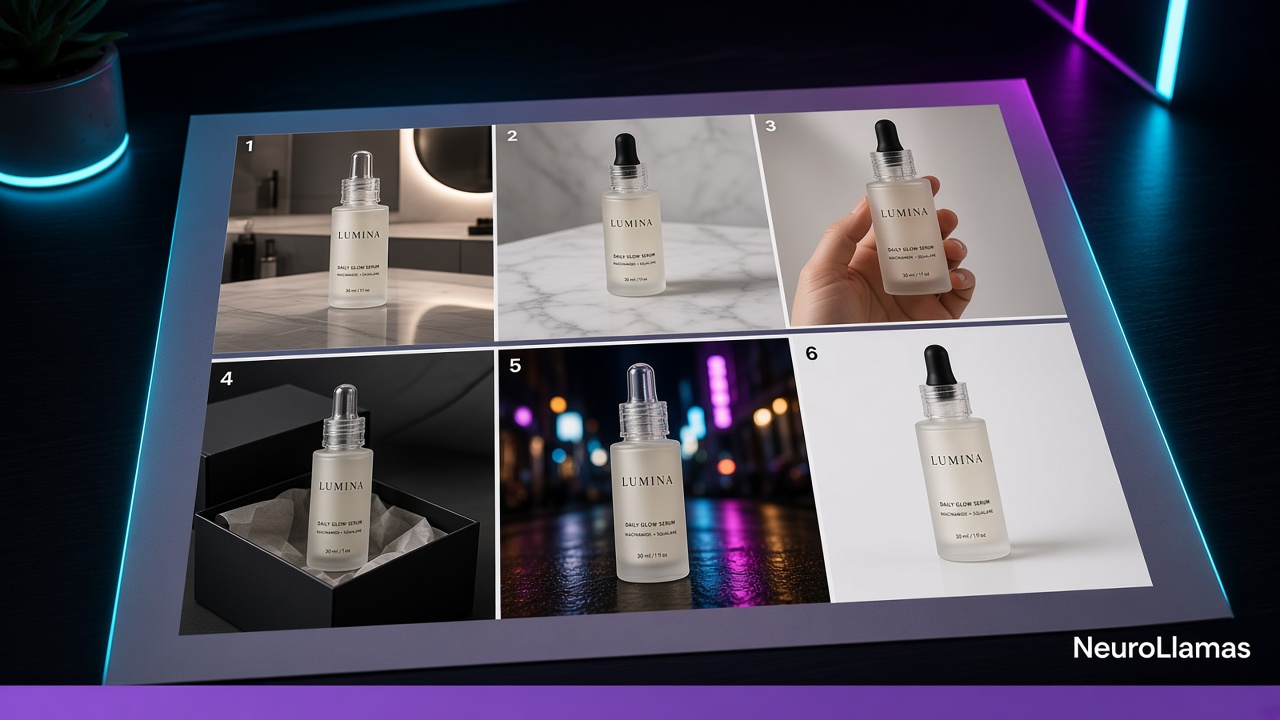
Start with one hero SKU and prove the workflow before processing the full catalog. Generate the three scene families, review them beside existing brand assets, and note corrections. Once the recipe is stable, move through products in small batches organized by material and shape. Similar products share lighting and surface requirements.
Name files with SKU, variant, scene family, crop, version, and approval status. Keep drafts separate from publish-ready exports. Save the prompt or brief, source references, approved output, and any composited label together. This creates traceability when someone needs a new crop months later.
Do not replace essential product-page angles with generated lifestyle scenes. Customers still need clean, truthful views. Use AI-assisted photography to expand context and campaign range, not to conceal missing product evidence.
Adapt one approved scene across formats
Once a scene passes QA, create purposeful variants: square feed crop, vertical Story or Reel cover, portrait carousel, and landscape editorial banner if needed. Reframe from the approved source rather than regenerating the entire scene for each ratio when possible. This reduces product drift.
Use one asset as the visual anchor for several content jobs. A catalog frame can lead a comparison carousel. A use-case frame can support a caption about product fit. An editorial frame can introduce a launch. The guides to Instagram carousels that convert and Instagram captions that rank and sell show how to turn those views into a useful post.
If the image will become video, separate movable elements and preserve a clean product layer. Follow the AI Reels sales workflow so motion proves a feature rather than distorting the item for spectacle, then use UGC-style Reels without hiring creators for a native demonstration format.
Measure consistency as an operating result
Visual consistency is partly qualitative, but the workflow can still be measured. Track approval rate on first review, average revisions per asset, common rejection reasons, and time from brief to approved export. A falling revision count indicates that references and recipes are improving.
For commercial response, compare similar posts by format and offer. Review saves, profile actions, product-page sessions, add-to-carts, and returns or complaints related to visual mismatch. Do not claim that one background color caused sales from a single post. Look for repeated patterns while controlling obvious differences.
Adobe’s overview of brand guideline fundamentals provides useful context for documenting repeatable identity decisions. For platform image and publishing controls, consult the official Instagram Help Center.
Organize approvals for a small team
Assign one creative owner and one product-accuracy owner. Creative checks the visual brief. Product checks SKU truth. A founder should not need to re-litigate personal taste on every image once the standard is approved. Comments should point to a rule: “shadow is too hard for the catalog family,” not “I do not love it.”
Keep a rejection log with categories such as color drift, shape drift, wrong prop, inconsistent light, label error, or unusable crop. Update the brief when the same issue appears repeatedly. The system should learn from reviews.
Move approved batches into the cadence described in content autopilot for retail brands. Asset consistency and publishing consistency reinforce each other; neither helps if approved work sits in an unorganized folder.
A one-week installation plan
- Day one: select one hero SKU and gather accurate source views.
- Day two: translate brand language into the one-page visual brief.
- Day three: define catalog, use-case, and editorial recipes.
- Day four: produce a small set and run brand, product, and technical QA.
- Day five: correct the recipes, approve final images, and export format variants.
- Day six: place images into a carousel, Reel cover, or captioned post.
- Day seven: document rejection reasons and prepare the next SKU batch.
The deliverable is not merely a set of images. It is a reusable production standard. Once installed, it reduces subjective review and makes a small catalog easier to expand.
Use AI as a controlled extension of the brand
On-brand AI product photos come from constraint: clear source evidence, a limited visual world, repeatable recipes, and strict product QA. The objective is not to make every image look generated or impossibly perfect. It is to create useful product context that customers recognize and trust.
Generate the scene set in the Neurollamas studio, then fix labels, crops, and type in Pro Edit before anything is called final. Store the visual rules on the brand profile and lock any repeating model on the character sheet. The same approved frame should be able to lead a grid you check in Instagram UI and a product page you sketch in Website UI. If the photos will move, send the clean still into the video engine instead of inventing a new product in motion.
Continue with batching a month of shop content, and browse Neurollamas Mag whenever the image system needs a stronger carousel, caption, or publishing workflow.